
How To
How to Fix Error Code 279 in Roblox in 3 Easy Methods

- March 18, 2021
- Updated: July 2, 2025 at 4:10 AM
Roblox is a delightful online multiplayer game. However, getting an error code when trying to play can be highly frustrating.
Take error code 279, for example. This error code seems to pop up frequently out of nowhere, but what does it mean? We`ll explain why it appears and, more importantly, how you can fix it to continue enjoying your favorite Roblox games.
What Is Error Code 279?
You may be wondering what does error code 279 mean? This error code usually comes up when there is a connection failed error, and the client (that is, you) cannot connect to the game server.
However, do not confuse error code 279 with error code 274. When you get error code 274, it is because developers have shut down the server for maintenance. Error code 279 indicates that there are other connection issues.
Error 279 will usually appear with the message: Failed to connect to the game, ID: 17, Error code 279.
There are three different IDs that can be associated with this error.
- ID 17
- ID 146
- ID 148.
Of these three IDs, ID 17 is the most common one.
Below are the most frequent causes of the 279 error rode on Roblox:
- Slow internet connection
- Windows Firewall
- Badly scripted game
How to Fix Error Code 279 in Roblox
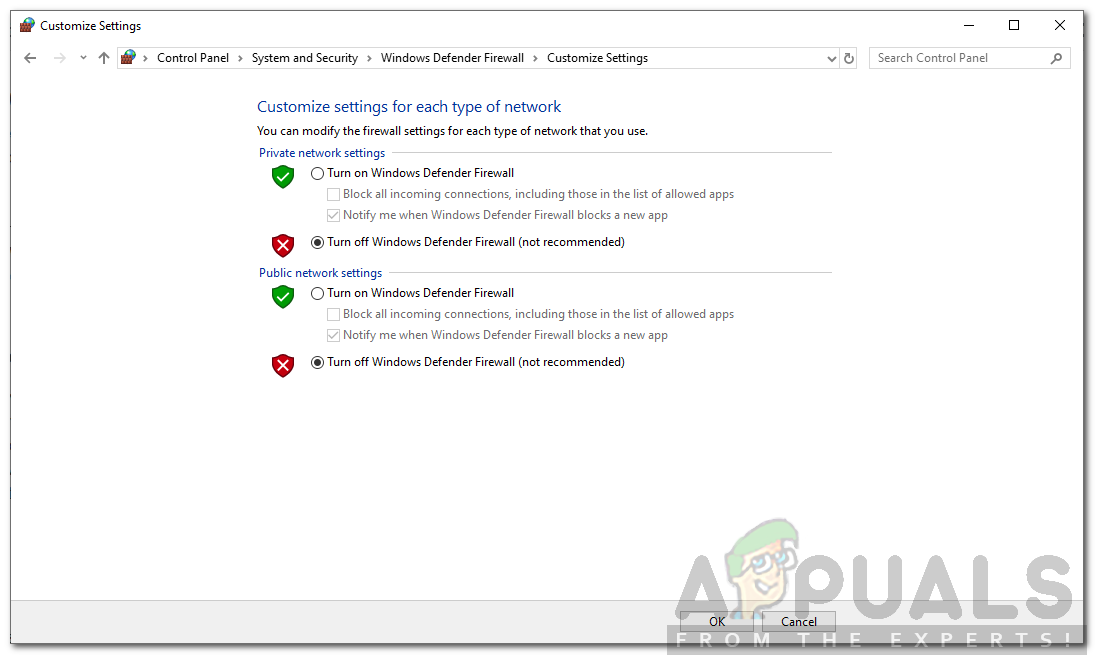
Method 1: Turn Off Your Firewall
Try turning off your firewall first and see if the problem continues.
If you do not get the same error when going back into Roblox, it is most likely your firewall blocking the game. Knowing this, you can then allow Roblox access in your firewall settings. This solution will not be possible if you play on your mobile, iPad, or mac.
Method 2: Use a Supported Browser
If you are playing on the computer through a browser, make sure you use a supported browser. Roblox does not support some browsers.
If you use Firefox or Chrome, which are supported, and you still get this error, update your browser to the latest version.

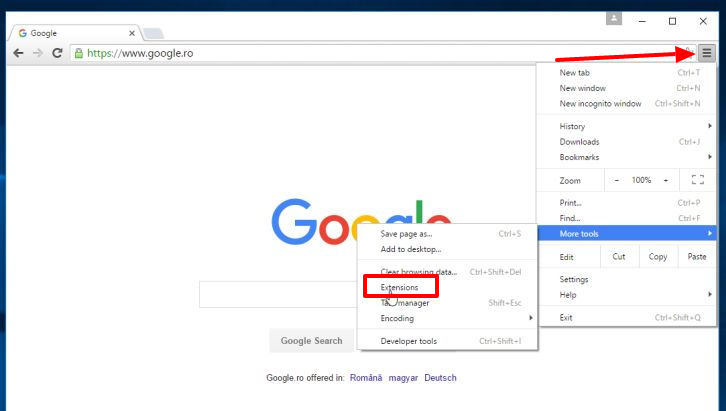
Method 3: Disable Browser Extensions
Active browser extensions can sometimes cause this error. Disable your browser extensions to see if the game works better.
Which One Worked for You?
As you can see, there are a few simple ways you can go about resolving this issue. There is no reason why an error 279 should prevent you from having a fun gaming experience.
If you’re a fan of Roblox, check out some of the other similar titles like Minecraft or Fortnite.
Choose Softonic on Google and you'll see more of our articles in Top Stories, AI Overviews and AI Mode.
Latest from Shaun M Jooste
You may also like
 News
GTA 6 is already the Game of the Year favorite: 89% odds on Polymarket
Read more
 News
Magic: The Gathering confirms Dimension cards for 2027: Star Trek gets actor-signed cards
Read more
 News
One Piece now looks set to continue beyond 2030: Oda updates the timeline
Read more
 News
Under Story is now a GMA Book Club pick: Chloe Benjamin’s novel is out
Read more
 News
Ubisoft reportedly has two more Assassin’s Creed games in the works: Ancient Rome and Jerusalem
Read more
 News
Green Room is now free on Tubi: Patrick Stewart’s darkest role
Read more